Intervengine React Native SDK
React Native wrapper for the Intervengine Mobile SDK, built with Expo Modules and Kotlin Multiplatform (KMP).
Overview
This SDK provides a React Native interface to the Intervengine platform, enabling mobile apps to:
- Authenticate users and manage sessions
- Fetch and display embeddable cards
- Listen to real-time updates via Server-Sent Events (SSE)
- Manage user context and state
Architecture
The SDK consists of three main layers:
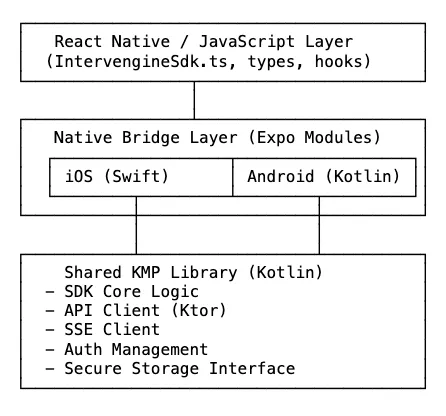
How It Works
- TypeScript SDK (
IntervengineSdk.tsx): High-level API that React Native apps use - Native Modules: Platform-specific bridge code (Swift for iOS, Kotlin for Android)
- KMP Shared Library: Cross-platform business logic written in Kotlin
The native modules use Expo Modules API, which provides:
- Automatic type conversion between native and JavaScript
- Promise-based async functions
- Event emitters for native → JavaScript communication
- No need to write JSI/JNI code manually
Installation (NPM package not published yet)
npm install intervengine-rn-sdk
Usage
Basic Setup
import { IntervengineSdk } from 'intervengine-rn-sdk';

// Initialize the SDK
const sdk = await IntervengineSdk.initialize({
  apiUrl: '<https://your-api-url.com>',
  apiKey: 'your-api-key',
  appId: 'your-app-id',
  appSecret: 'your-app-secret',
  initialPageSize: 20,
  enableLogging: true,
});

// Start listening for events
await sdk.start('participant', 'user-123');
Listening to Auth State Changes
import { useEffect, useState } from 'react';

function MyComponent() {
  const [authState, setAuthState] = useState('loading');

  useEffect(() => {
    if (!sdk) return;

    // Get current auth state
    sdk.getCurrentAuthState().then((state) => {
      setAuthState(state.state);
    });

    // Listen for auth state changes
    const subscription = sdk.addAuthStateListener((state) => {
      console.log('Auth state:', state.state);
      console.log('Access token:', state.accessToken);
      setAuthState(state.state);
    });

    return () => subscription.remove();
  }, [sdk]);

  return <Text>Auth State: {authState}</Text>;
}
Fetching Cards
// Fetch embeddable cards
const cards = await sdk.getEmbeddableCards(1, 20); // page, perPage

cards.forEach((card) => {
  console.log('Card:', card.title, card.url);
});
Listening to Card Updates
useEffect(() => {
  if (!sdk) return;

  const subscription = sdk.addCardsUpdateListener((update) => {
    console.log('New cards received:', update.newCards);
    // Refresh your cards list
  });

  return () => subscription.remove();
}, [sdk]);
Getting User Context
const context = await sdk.getUserContext();
console.log('User ID:', context.userId);
console.log('Access Token:', context.accessToken);
Complete Example
import React, { useEffect, useState } from 'react';
import { View, Text, FlatList } from 'react-native';
import { IntervengineSdk } from 'intervengine-rn-sdk';

function App() {
  const [sdk, setSdk] = useState(null);
  const [authState, setAuthState] = useState('loading');
  const [cards, setCards] = useState([]);

  useEffect(() => {
    // Initialize SDK
    IntervengineSdk.initialize({
      apiUrl: '<https://api.example.com>',
      apiKey: 'your-key',
      appId: 'your-app-id',
      appSecret: 'your-secret',
    }).then(async (sdkInstance) => {
      setSdk(sdkInstance);

      // Start listening for events
      await sdkInstance.start('participant', 'user-123');

      // Fetch initial cards
      const initialCards = await sdkInstance.getEmbeddableCards(1, 20);
      setCards(initialCards);
    });
  }, []);

  useEffect(() => {
    if (!sdk) return;

    // Listen for auth state changes
    const authSub = sdk.addAuthStateListener((state) => {
      setAuthState(state.state);
    });

    // Listen for new cards
    const cardsSub = sdk.addCardsUpdateListener(async () => {
      const updatedCards = await sdk.getEmbeddableCards(1, 20);
      setCards(updatedCards);
    });

    return () => {
      authSub.remove();
      cardsSub.remove();
    };
  }, [sdk]);

  return (
    <View>
      <Text>Status: {authState}</Text>
      <FlatList
        data={cards}
        renderItem={({ item }) => (
          <View>
            <Text>{item.title}</Text>
            <Text>{item.descriptionText}</Text>
          </View>
        )}
        keyExtractor={(item) => item.id}
      />
    </View>
  );
}
API Reference
IntervengineSdk.initialize(config)
Initialize the SDK with configuration.
Parameters:
config.apiUrl: API endpoint URLconfig.apiKey: API keyconfig.appId: Application IDconfig.appSecret: Application secretconfig.initialPageSize: Initial page size for cards (default: 10)config.enableLogging: Enable debug logging (default: false)
Returns: Promise<IntervengineSdk>
sdk.start(userType, userId)
Start listening for Server-Sent Events (SSE).
Parameters:
userType:'participant'or'external'userId: User identifier
Returns: Promise<void>
sdk.stop()
Stop listening for SSE events.
Returns: Promise<void>
sdk.signOut()
Sign out and clear SDK state.
Returns: Promise<void>
sdk.getEmbeddableCards(page, perPage)
Fetch embeddable cards.
Parameters:
page: Page number (default: 1)perPage: Items per page (default: 10)
Returns: Promise<EmbeddableCard[]>
sdk.getUserContext()
Get current user context.
Returns: Promise<{ userId: string, accessToken: string }>
sdk.getCurrentAuthState()
Get current authentication state.
Returns: Promise<AuthStatePayload>
sdk.addAuthStateListener(callback)
Listen for authentication state changes.
Parameters:
callback:(state: AuthStatePayload) => void
Returns: { remove: () => void }
sdk.addCardsUpdateListener(callback)
Listen for card updates.
Parameters:
callback:(update: CardsUpdatePayload) => void
Returns: { remove: () => void }
Types
AuthStatePayload
type AuthStatePayload = {
  state: 'authenticated' | 'unauthenticated' | 'loading' | 'error';
  accessToken?: string; // Present when state is 'authenticated'
  error?: string; // Present when state is 'error'
};
EmbeddableCard
type EmbeddableCard = {
  id: string;
  url: string;
  activityPlanType: string;
  title: string;
  descriptionText: string;
  imageUrl: string;
  isOneOff: boolean;
  scheduledAt: string;
  reportedAt: string;
};
CardsUpdatePayload
type CardsUpdatePayload = {
  newCards: EmbeddableCard[];
};