Transitions
Transitions define how to move from one State to the next. You can add Transitions between States in two ways:
Drag a new Transition from the output of one State and connect it to the input of another State:
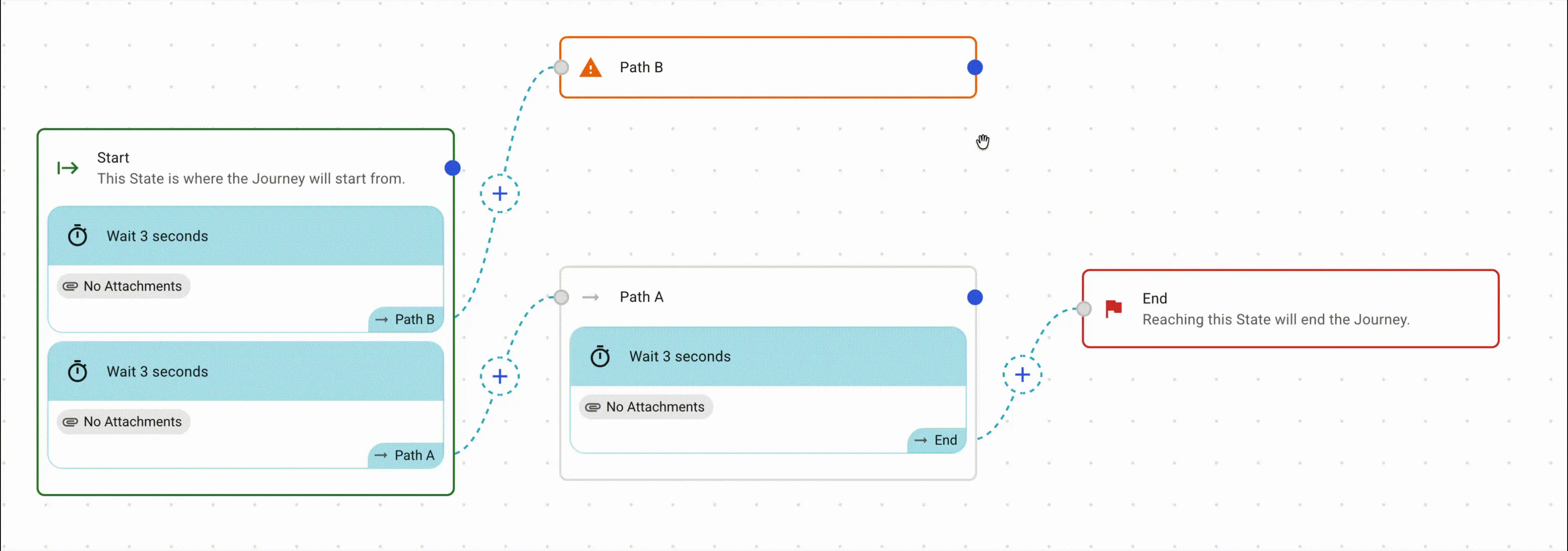
All Transitions have to move from one State to another State. This is controlled via the Trigger
TimeSeconds, Minutes, Hours, Days from reaching the StateTime from StartSeconds, Minutes, Hours, Days from when the Journey has startedResponseWhen the user responds to a previous Message that the Journey has sentSignalWhen a specifc event happens within Intervengine
When a Transition is executed, you can add Attachments, these will be executed as the participant moves through the Journey
Send MessageApp Message, Notification, Email, SMSAdd CardStart JourneyAllows you to chain Journeys together and preform branchingAssign TagsorRemove TagsAdd GroupsAdd ExtrasAdd Task
Send Message Autofills
Send Message attachments support autofills — placeholders in the subject or
body that the platform replaces with real values when the message is sent. The
syntax is a single pair of braces around the autofill name, e.g.
{recipientFirstName}.
Autofills work in any text field on a Send Message attachment (subject, HTML body, plain text body, in-app / SMS / push / card content) regardless of the channel.
For most journey messages the recipient and participant are the same person — the autofills exist as separate sets so a message sent to a coach can still reference the participant the message is about.
| Autofill | Replaced with |
|---|---|
{appName} | The app / tenant name (e.g. "BoostMe", "Anthogen") |
{recipientFirstName} | First name of the person receiving the message |
{recipientLastName} | Last name of the person receiving the message |
{recipientUserId} | Internal Firebase user ID of the recipient |
{recipientId} | Internal Intervengine user ID of the recipient |
{recipientDynamicLink} | Firebase dynamic link that opens the app for the recipient |
{recipientPasswordResetLink} | Password reset link for the recipient — only generated when the recipient has an email address |
{participantFirstName} | First name of the journey participant |
{participantLastName} | Last name of the journey participant |
{participantUserId} | Internal Firebase user ID of the participant |
{participantId} | Internal Intervengine user ID of the participant |
If an autofill has no value for the recipient (e.g.
{recipientPasswordResetLink} when the recipient has no email), it is replaced
with an empty string. Autofill names are case-sensitive.